 Curious Mints
Creating Custom Workflows in Warp Terminal
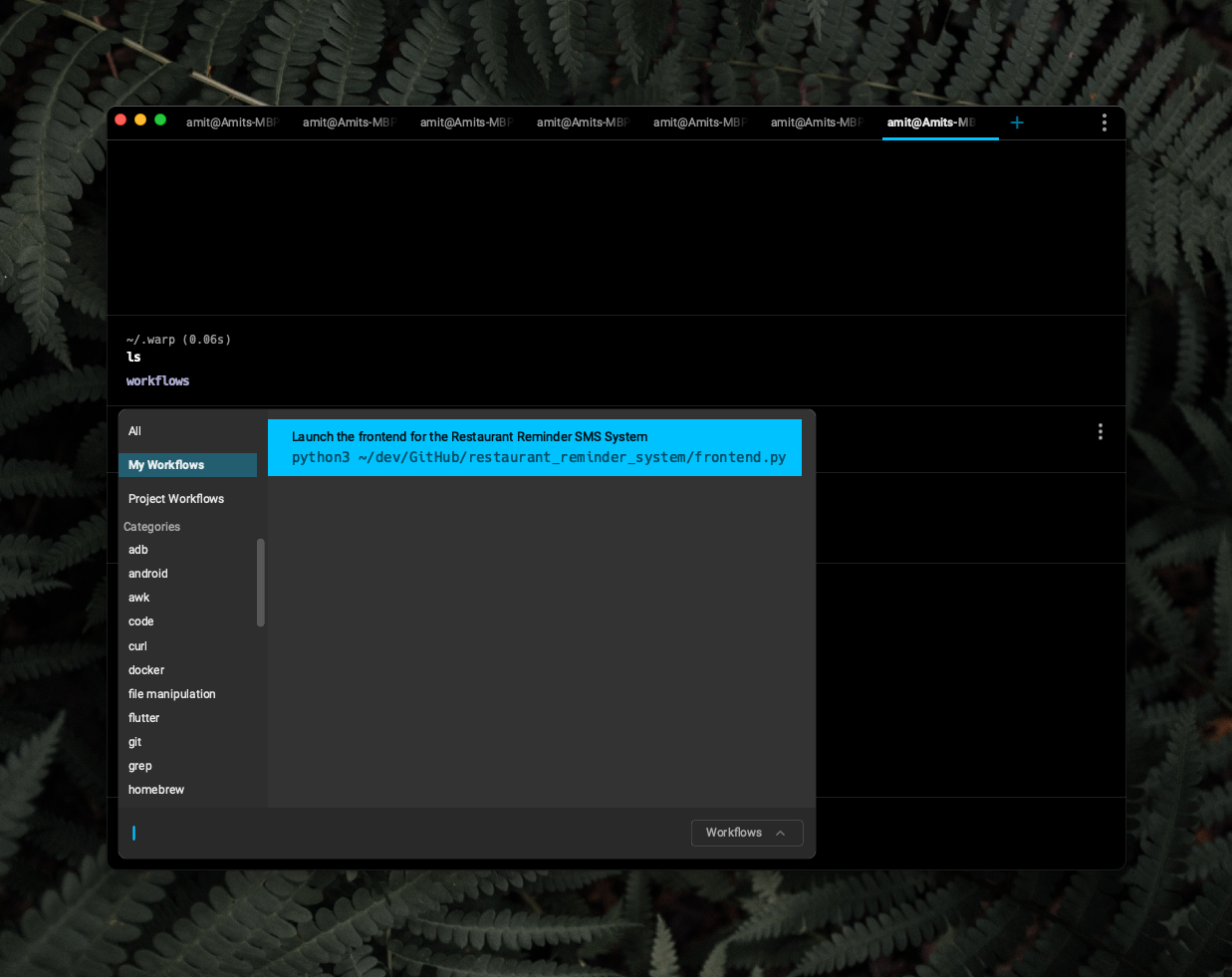
Warp Workflows are searchable, sharable aliases, one YAML file each in ~/.warp/workflows. Made one that launches a Flask app with arguments; it shows up under Ctrl+Shift+R.
I’ve been playing around with warp.dev, which is a new terminal app for Mac (Windows coming soon it looks like) with a focus on improving developer productivity. Looks really good, and has already improved quite a few workflows for me.
Speaking of which, it actually has a feature called Workflows, which is a more flexible and powerful version of alias’. For one they’re searchable from within warp, which makes it easier to explore and use them. They’re also sharable, so you can create a workflow, and share with your team members.
Here’s how I created my first workflow. I wanted to see if I could create a workflow that launches a Flask app with some arguments. It’s a pretty simple one, which could easily be an alias too, but I guess it’s a good hello world of sorts.
Creating the workflow
Step 1: Create a subdirectory within the ~/.warp folder called worlflows (the .warp doesn’t exist by default, so we will have to create this too with the -p parent flag)
mkdir -p ~/.warp/workflows
Step 2: Create a yaml file for your workflow inside this workflows directory. Here’s a template
---
# The name of the workflow.
name: Uninstall a Homebrew package and all of its dependencies
# The corresponding command for the workflow. Any arguments should be surrounded with two curly braces. E.g `command {{arg}}`.
command: |-
    brew tap beeftornado/rmtree
    brew rmtree {{package_name}}
# Any tags that the workflow should be categorized with.
tags:
  - homebrew
# A description of the workflow.
description: Uses the external command rmtree to remove a Homebrew package and all of its dependencies
# List of arguments within the command.
arguments:
    # Name of the argument within the command. This must exactly match the name of the argument
    # within the command (without the curly braces).
  - name: package_name
    # The description of the argument.
    description: The name of the package that should be removed
    # The default value for the argument.
    default_value: ~
# The source URL for where the workflow was generated from, if any.
source_url: "https://stackoverflow.com/questions/7323261/uninstall-remove-a-homebrew-package-including-all-its-dependencies"
# The author of the workflow.
author: Ory Band
# The URL of original author of the Workflow. For example, if this workflow was generated from StackOverflow, the `author_url` would be the StackOverflow author's profile page.
author_url: "https://stackoverflow.com/users/207894"
# The valid shells where this workflow should be active. If valid for all shells, this can be left empty.
# See FORMAT.md for the full list of accepted values.
shells: []
I modifed the command in this file to a python3 file, that essentially launches a flask app with some arguments.
The new workflow immediately shows up in Warp (CTRT+SHIFT+R). Selecting it from the UI pastes the command in the terminal window.
The summary at the top was generated by AI.