How I Point DigitalOcean App Platform Apps to My Own Subdomains

I keep forgetting this, so here’s the short, clear version for future me.
I often have a bunch of small apps running on DigitalOcean App Platform. By default, they get those long URLs like:
tigerden-app-u1ju3.ondigitalocean.app
They work, but they’re ugly and not something I want to share. What I actually want is something like:
type.curiousmints.com
Here’s how I do that properly — without weird redirects, broken HTTPS, or guessing.
The one mental model that matters
There are two separate systems, and both need to be configured:
- DNS (Porkbun, in my case)
→ tells the internet where to send traffic - DigitalOcean App Platform
→ tells the app which domains it’s allowed to respond to
You must do both. Doing only one leads to half-working setups and confusing bugs.
Step 1: Add a CNAME in my DNS provider (Porkbun)
This answers the question:
“When someone visits type.curiousmints.com, where should that go?”In Porkbun, I add a CNAME record:
- Type: CNAME
- Host:
type - TTL: default is fine
Value:
tigerden-app-u1ju3.ondigitalocean.appImportant reminders:
- No
https:// - No trailing slash
- Just the hostname
At this point, traffic can reach DigitalOcean — but the app still won’t fully accept it yet.
Step 2: Add the domain inside DigitalOcean App Platform
This is the step I forget most often.
In DigitalOcean → App Platform:
- Open the app
- Go to Settings → Domains
- Click Add domain
- Choose “You manage your domain”
- Save
Enter:
type.curiousmints.com
DigitalOcean will show the same CNAME target again. That’s good — it means both sides agree.
Now DigitalOcean knows:
- this app is allowed to serve that domain
- it should issue an SSL certificate for it
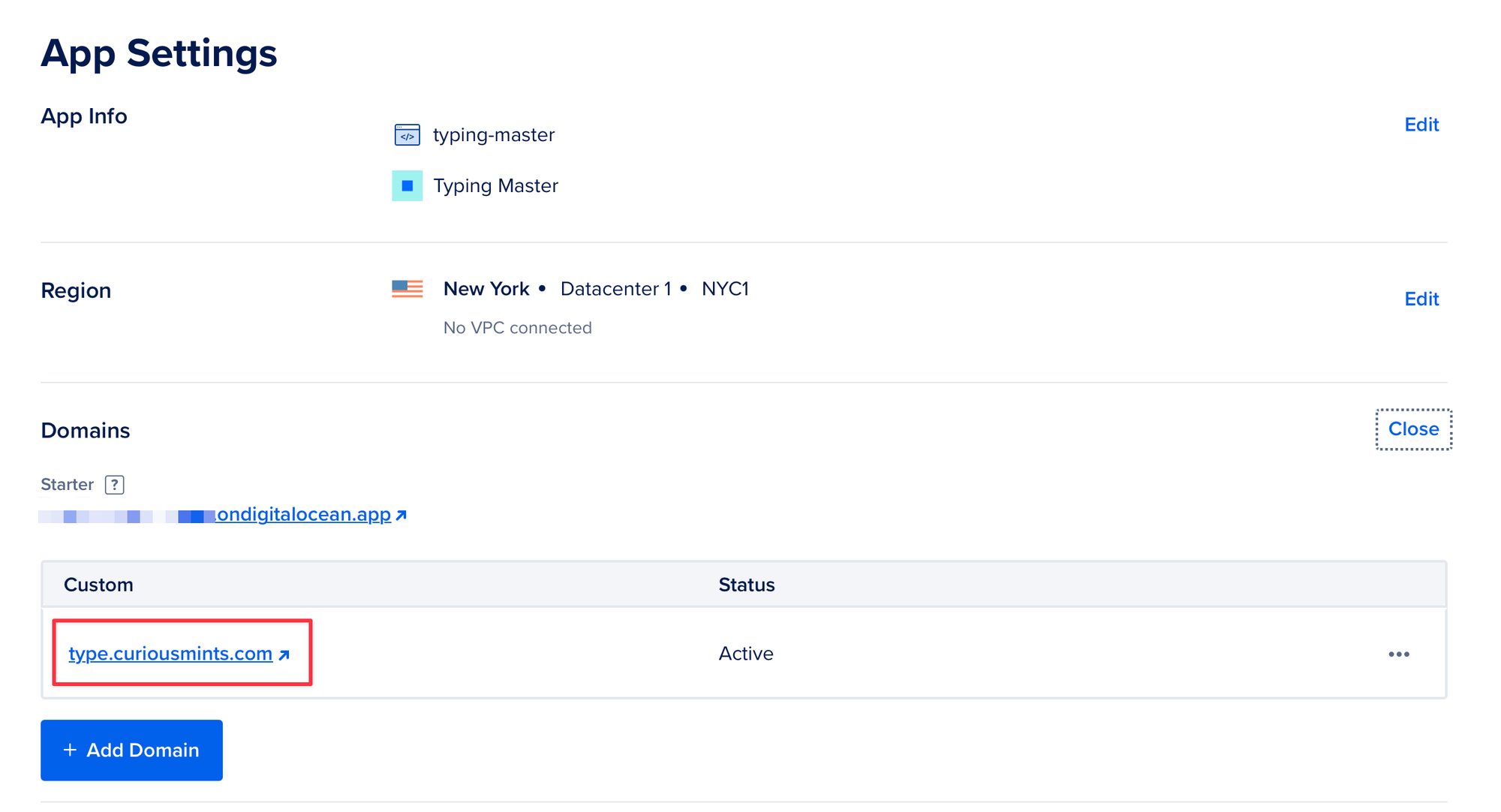
Step 3: Wait for “Pending” → “Active”
After adding the domain, the status will say Pending.
This usually takes:
- 1–5 minutes
- occasionally up to ~15 minutes
When it flips to Active, HTTPS is ready.
Step 4: Check it worked
I open:
https://type.curiousmints.com
What I expect:
- The app loads
- The URL stays on my domain
- HTTPS works
- No redirect to
http:// - No
.ondigitalocean.appshowing anywhere
If all of that is true, I’m done.
Common mistake (worth calling out)
If I see:
- a blank page
- or it redirects to
http://type.curiousmints.com
That almost always means:
- I forgot to add the domain in App Platform, or
- the domain is still Pending
It’s rarely a DNS problem if the page is loading at all.
The repeatable checklist (TL;DR)
Every time I do this for a new app:
- Add CNAME in Porkbun
- Add domain in DigitalOcean App Platform
- Wait for Active
- Test HTTPS
That’s it.
Future me: don’t overthink this.